Public Beta 5 of the Metric Halo 3d software is now available for download.
A detailed change log is available at the bottom of this message.
The direct download link for the software is:
3d Public Beta Quick Start Guide
There is an abbreviated quick start guide linked below to help you get started; it has been updated for pb5:
3d Beta Quickstart Guide
The component versions in this release are:
| Package Version: | beta_3d-pb5 | Updated |
| MIO Console Version: | 6.0.0 [3321] | Updated |
| Firmware Version : | 6.0.70 | Updated |
| Driver Version : | 2.0.43 | Unchanged |
NOTE: You only need to install updated components.
The highlights of this release are:
- Digital Port Lock Status UI
- TOSLINK/ADAT output mode selection
- Fix SMUX support for ADAT
- Identify LIO-8 units properly
- Support legacy MADI input frames (e.g. 56 channel input frames)
- Ensure unconnected Optical MADI input doesn't generate noise
- Update Front Panel with proper status indications
- Allow 2882 and ULN-2 to run at 4x rates (ADCs disabled in this case)
- Allow forgetting offline domains and/or boxes
- Many resolved issues
- New & Updated plugins:
- Polarity Invert plugin
New Features Overview: Digital Port Status and Control UI
You can access the Digital Port Status and Control UI from the system status pane. Each box has a "Digital Port Status and Control UI" button (which looks like "01010..." in the upper right corner of the pane, circled in red below) in its status pane:
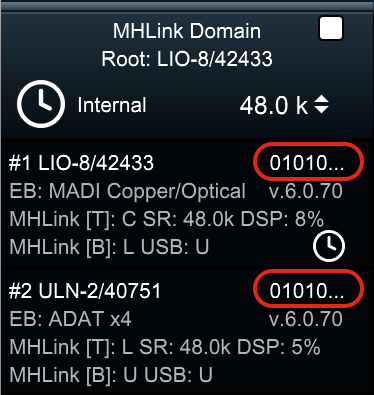
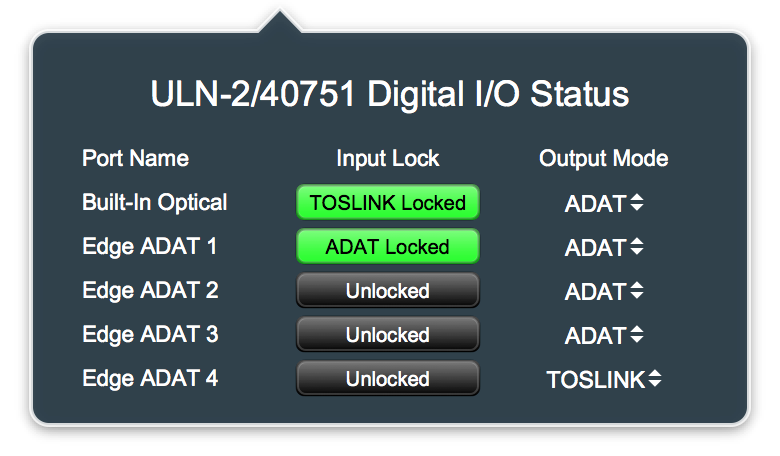
Click the "01010..." to pop up the Digital Port Status and Control UI for that box:
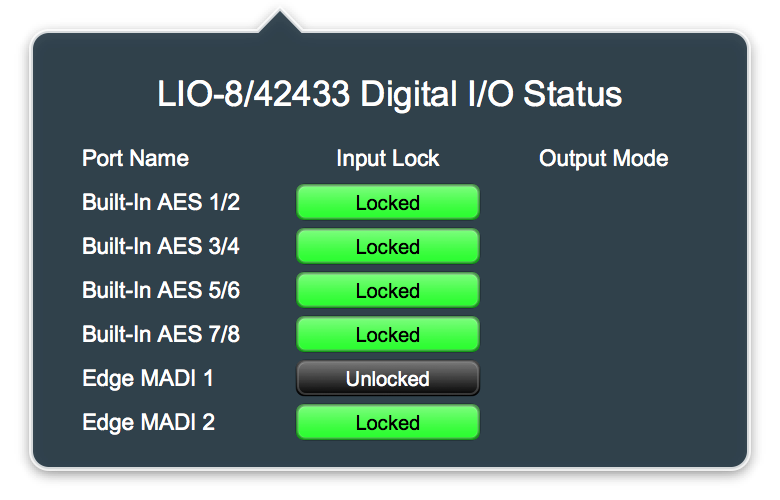
The UI has 3 columns:
- Port Name - The name of the physical Digital I/O port
- Input Lock - Lock Status and Mode of the Digital Input port
- Output Mode - Ouput Mode selector for the Digital Output port (if available for the port type)
The UI will list all the installed ports for the device (so it will also show
any digital ports that are installed via EdgeCard).
For most digital port types
(AES/SPDIF/MADI) the input can either be locked or not, and there is no configurable mode for the output.
For the ADAT Optical ports each input port can be locked to either ADAT or TOSLINK (Optical SPDIF) or unlocked (if there is no valid input signal of either type on the port). The output ports can either send ADAT (8 channels) or TOSLINK (e.g. Optical SPDIF - 2 Channels). You can select what signal type you want to send on a per port basis with the associated popup menu.
New Features Overview: Optical Routing
The 3d Card has a SPDIF transmitter and an ADAT transmitter for each Optical Output Port. When you select between the output port mode, you are selecting which transmitter is physically connected to the port. Each transmitter has its own output routing in the system. As a result, when an output port is set to TOSLINK mode, you must route to the associated TOSLINK channels in order to get output. When it is set to ADAT mode, you must route to the associated ADAT channels to get output.
When an input port is receiving TOSLINK the hardware automatically determines the incoming format. The first two channels of each receiver block will carry either the first two ADAT inputs for the port or the SPDIF inputs for the port, depending on the received signal. So you can route from the TOSLINK input channels or from the first two channels of the associated ADAT block. When it is receiving ADAT, you should use the associated ADAT inputs to have access to all of the ADAT channels.
New Features Overview: Delete Offline Unit/Domain
When you use multiple boxes and systems it is possible to get an offline Unit or Domain in your console setup that is now redundant and unneeded. pb5 provides
support to allow you to remove these offline items from your setup.
To remove an offline Unit from your setup:
- Right-Click or control-Click on the unit tile in the system status pane
- Select "Delete Offline Unit" from the menu that pops up
To remove an offline Domain from your setup:
- Right-Click or control-Click on the Domain tile or the Root Unit tile in the system status pane
- Select "Delete Offline Domain" from the menu that pops up
[Detailed Changelog]
Changes Since beta_3d/pb4: (90 commits)
- FEATURE: add digital lock indicators and mode controls
- FEATURE: Persist digital port output mode setting .cnsl file, and restore on load
- FEATURE: [ mhbug://0005045 ] Add Polarity Invert plugin
- FEATURE: [ mhbug://0004988 ] Allow removal (deletion) of offline domains and boxes
- FEATURE: [ mhbug://0003411 ] Add command to reset all peak holds and clip indicators
- BUG FIX: skip meter load if the meter base address is null
- BUG FIX: clip the headamp mode to the valid range
- BUG FIX: [ mhbug://0005300 ] Fix crash that occurs if user deletes plugin from graph by doing click hold delete
- BUG FIX: [ mhbug://0005120 ] Fix crash due to applying an insert when nothing is selected (due to user hitting return key)
- BUG FIX: [ mhbug://0005112 ] Fix lack of RP tracks if the only routed source to the computer is the post direct out
- BUG FIX: [ mhbug://0005105 ] Exclude phantom power from mixer link groups
- BUG FIX: [ mhbug://0005062 ] Fix HP full mute when muting L channel only
- BUG FIX: [ mhbug://0005056 ] Fix crash when routing a strip that has pre insert Auxes (and correctly route it)
- BUG FIX: [ mhbug://0005056 ] Fix crash when removing routing for a strip w/ preinsert Auxes (and correctly unroute it)
- BUG FIX: [ mhbug://0005054 ] Do not show panner on aux send if strip width equals or exceeds bus width
- BUG FIX: [ mhbug://0005053 ] Update default busId to allow support for main mix
- BUG FIX: [ mhbug://0005052 ] Ensure deleting last domain fully clears UI to avoid crash
- BUG FIX: [ mhbug://0005051 ] Validate surfaceTargetMixBusId and ensure that we point to a valid mixbus
- BUG FIX: [ mhbug://0005022 ] Add missing bypass parameter to Simple Pitch Shifter
- BUG FIX: [ mhbug://0004905 ] Fixes problem with new strips not appearing in EuCon
- BUG FIX: [ mhbug://0004742 ] Allow Analog I/O Pane to get smaller so more boxes can be fit on screen
- BUG FIX: [ mhbug://0004726 ] Identify LIO Units Properly
- BUG FIX: [ mhbug://0003420 ] Improve click to clear peak hold behavior for meters in mixer
- BUG FIX: Update channel assignments for updated firmware that fixes EdgeCard ADAT S/MUX
- BUG FIX: Sum stereo strip to mono bus rather than just routing left channel of strip
- BUG FIX: Rearrange serialization order to better deal with forward compatibility
- BUG FIX: Protect against empty toplogy
- BUG FIX: Improve layout and labelling for digital status pane
- BUG FIX: Force proper bus id if incorrect main bus id detected
- BUG FIX: Fix incorrect port layouts for ADAT SPDIF cards (1x and 2x were swapped)
- BUG FIX: Fix incorrect assign
- BUG FIX: Explicitly handle exceptions thrown if plugin relocations fail
- BUG FIX: Ensure notification center transfers when assigned
- BUG FIX: Ensure input allocator exists before using it
- BUG FIX: Ensure each MADI port has its own lock bit
- BUG FIX: Ensure cuebus assign is associated with container
- BUG FIX: Cleanup remote heap refs when probing HW as they are stale
Firmware Changes since 6.0.62 (77 commits)
- FEATURE: [ mhbug://0005101 ] Adjust default boot routing to route to the headphones
- FEATURE: Surface digital input lock indication bits into the unit info block
- FEATURE: Make MADI RX Lock State available to software
- FEATURE: Allow internal clock to be 4x on all units
- FEATURE: Add support for reporting presence of preamp boards on LIO 8 & ULN 8 to rest of system
- FEATURE: Add memory access to TX TOSLINK/ADAT mode switches
- BUG FIX: Fix SMUXed TX channels on EdgeCards with ADAT
- BUG FIX: [ mhbug://0004948 ] Keep meters running until pipeline empties
- BUG FIX: [ mhbug://0003636 ] Enable the Computer/Firewire indicator on the front panel
- BUG FIX: [ mhbug://0003416 ] Ensure 2882 shows phantom status on front panel
- BUG FIX: Use locked state from RX components to drive digital input locked indicators on Front Panel
- BUG FIX: Update FP Clock source indicators based upon current Clock Source
- BUG FIX: Split ADAT RX demux into two 32 channel blocks to match up with TX and channel assignments
- BUG FIX: Indicate AES clock source on LIO 8/ULN 8 FP if clock is derived from AES input
- BUG FIX: Fix EOF detection so that < 64 channels can be received via MADI RX
- BUG FIX: Ensure that mSystemInterface is set before using it
- BUG FIX: Ensure registers are initialized at power up
- BUG FIX: MADI Ensure all registers are initialized, add infrastructure to TX less than 64 channels
- BUG FIX: Add support for processing and vectoring legacy FP button presses
- BUG FIX: Add S/MUX flag to ADAT TX streams
- BUG FIX: Actually drive Mute and Dim indicators on 2882 FP